AppDelegate는 데이터 구조 초기화, 알림 설정
SceneDelegate는 UI와 관련된 상태 변화
정도로만 인지하고 있었는데 이번 기회에 새롭게 배웠다,,
이 둘의 기능은 iOS 13 이전과 이후 많은 변화가 일어났고,
그림으로 간단히 알아보자면 다음과 같다
iOS 13 이전
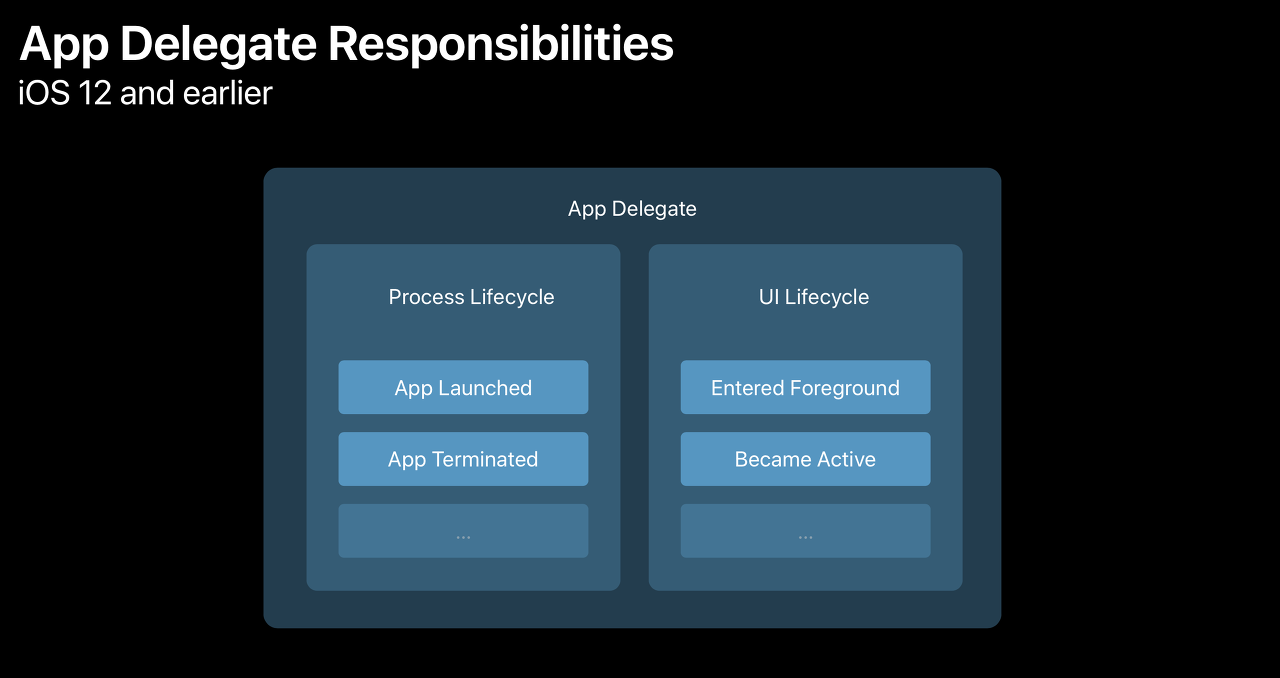
- AppDelegate 내에서 App Lifecyle과 UI Lifecycle 둘 다 진행
- 하나의 App에 하나의 window
그렇다면.. window는 뭐지..?
window
View 계층 구조의 최상위 객체
0.0
View 계층 구조도 공부해봐야겠다,,
iOS 13 이후
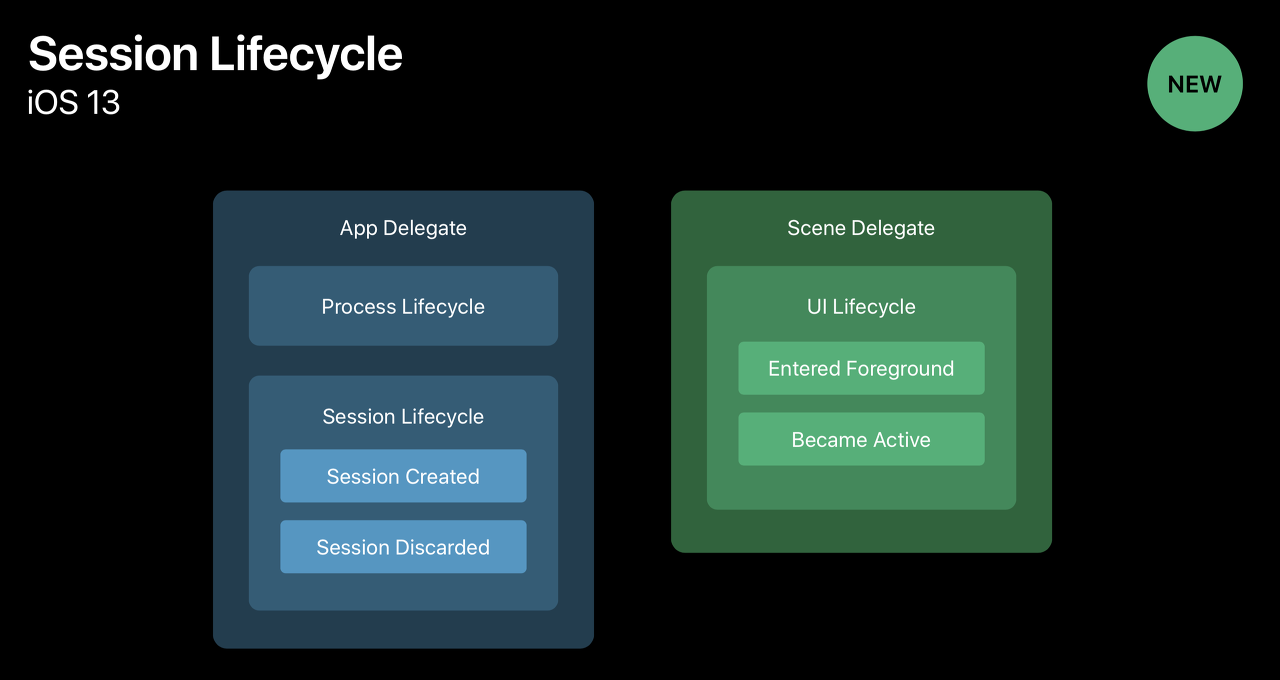
- App Delegate는 Session Lifecycle을 Scene Delegate은 UI Lifecycle을 담당하는 구조
- scene이 추가되면서 하나의 앱이 여러 scene을 가질 수 있게 됨
App Delegate 역할
1. 앱의 주요 데이터 구조 초기화
2. 앱의 scene 환경설정 (configuration)
2. 앱 외부에서 발생한 알림 (메모리 부족 경고,다운로드 완료) 대응
3. 앱 자체를 타겟하는 이벤트에 대응
4. 푸쉬 알림과 같이 실행시 요구되는 모든 서비스를 등록
즉, 앱 전체 수준의 이벤트를 처리하며, 백그라운드 작업, 원격 알림 등의 앱 전반적인 처리를 진행한다
App Delegate 메서드
//애플리케이션이 실행된 직후 사용자의 화면에 보여지기 직전에 호출
func application(_ application: UIApplication, didFinishLaunchingWithOptions launchOptions: [UIApplicationLaunchOptionsKey: Any]?) -> Bool

//애플리케이션이 최초 실행될 때 호출되는 메소드
func application(_ application: UIApplication, willFinishLaunchingWithOptions launchOptions: [UIApplication.LaunchOptionsKey : Any]? = nil) -> Bool

//애플리케이션이 InActive 상태로 전환되기 직전에 호출
func applicationWillResignActive(_ application: UIApplication)

//애플리케이션이 백그라운드 상태로 전환된 직후 호출
func applicationDidEnterBackground(_ application: UIApplication)

//애플리케이션이 Active 상태가 되기 직전, 화면에 보여지기 직전에 호출
func applicationWillEnterForeground(_ application: UIApplication)

//애플리케이션이 Active 상태로 전환된 직후 호출
func applicationDidBecomeActive(_ application: UIApplication)

//애플리케이션이 종료되기 직전에 호출
func applicationWillTerminate(_ application: UIApplication)
SceneDelegate 역할
1. UI 생명주기 관리
2. scene 상태 전환 관리
3. UI 상태 저장 및 복원
UI 및 화면 수준의 이벤트 처리를 진행하며, 각 scene 마다 독립적으로 상태를 관리한다
SceneDelegate 메서드
// 1. Scene이 생성될 때 호출 (초기화)
// Scene Session은 앱에서 생성한 모든 scene의 정보를 관리
func scene(_ scene: UIScene, willConnectTo session: UISceneSession, options connectionOptions: UIScene.ConnectionOptions)

// 2. Scene이 UI 상태를 복원할 때 호출
func scene(_ scene: UIScene, restoreInteractionStateWith stateRestorationActivity: NSUserActivity)

// 3. Scene이 활성화되기 직전 호출 (포그라운드로 전환되기 직전)
func sceneWillEnterForeground(_ scene: UIScene)

// 4. Scene이 활성화된 직후 호출 (포그라운드로 전환된 직후)
func sceneDidBecomeActive(_ scene: UIScene)

// 5. Scene이 비활성화되기 직전 호출 (백그라운드로 전환되기 직전)
func sceneWillResignActive(_ scene: UIScene)

// 6. Scene이 백그라운드로 전환된 직후 호출
func sceneDidEnterBackground(_ scene: UIScene)

// 7. Scene이 UI 상태를 저장할 때 호출
func stateRestorationActivity(for scene: UIScene) -> NSUserActivity?

// 8. Scene의 연결이 해제될 때 호출
func sceneDidDisconnect(_ scene: UIScene)
리소스 최적화: 시스템이 자동으로 관리
메모리와 리소스 절약을 위해 Background에 있는 scene을 자동으로 삭제
단순히 해당 scene의 UI 인스턴스만 제거된 것으로 필요할 때 scene을 빠르게 복원 가능
앱 실행시 메서드 순서
// 앱 실행 시 호출 순서
1. [AppDelegate] didFinishLaunchingWithOptions
2. [AppDelegate] configurationForSession
3. [SceneDelegate] willConnectToSession
4. [SceneDelegate] scene(_:willConnectTo)
   // 여기서 window = UIWindow(windowScene: scene as! UIWindowScene)
   // 이후 화면에 앱 등장
5. [SceneDelegate] willResignActive
6. [SceneDelegate] didEnterBackground
7. [SceneDelegate] didDisconnect
   // 이후 앱 화면을 명시적으로 종료
8. [AppDelegate] didDiscardSceneSceneSessions
Reference:
1. https://velog.io/@nnnyeong/iOS-AppDelegate-SceneDelegate
2. Claude와 GPT..
'IOS 개발지식 > iOS' 카테고리의 다른 글
| [iOS] XCTest를 활용한 UnitTest (1) | 2024.11.13 |
|---|---|
| [iOS] RxSwift와 Combine (2) | 2024.11.11 |
| [iOS] 클린 아키텍처 (0) | 2024.11.10 |
| [iOS] 앱 생명주기(App Life Cycle) (5) | 2024.11.07 |


